
 Best Platforms
 Live Odds






All team in FIFA World Cup: 7 Mistakes That Miss Markets
Fix “all World Cup teams” lists: lock the edition, use FIFA squad PDFs, build alias/code crosswalks, and count-check market coverage.
You’re building a checklist of World Cup teams so you can find every team-linked market across venues. The obvious move—grab a list from search results, paste it into a scanner, and start querying—breaks in quiet ways: the list is for the wrong edition, it’s a partial “qualified so far” snapshot, or it’s a historical roll-up that adds noise.
Get it wrong and you miss markets you meant to trade, or you waste time chasing teams that will never match a contract label. This guide walks through seven failure modes and a simple validation workflow so your final list is venue-ready, searchable, and complete.
Wrong team universe
Pick an edition
“All team in FIFA World Cup” is only a real checklist once you lock the edition. Otherwise you’ll mix different universes (finals fields vs historical appearances) and end up with a list that can’t be complete.
If you mean the World Cup 2026 final tournament—the World Cup itself (the finals), not the multi‑year qualification matches—your target set is fixed: FIFA describes the FIFA World Cup 2026 as the first edition to feature 48 teams and three co‑host countries, played across 104 games from kick‑off on 11 June to the final on 19 July (see FIFA’s Strategic Objectives (Goal 9)).
So don’t start from a mid‑qualification “qualified teams” snapshot and call it “all teams.” Until the finals field is complete, that universe is definitionally smaller than the finals universe you’re actually trying to scan.
Define “all teams”
Now decide what “all teams” means for your task:
If you’re building a market-scanning checklist, “all teams” usually means all finals participants for one edition (48 for 2026). That set is what winner, group, and advancement contracts are written against.
If you mean “all-time,” you’re no longer listing an edition—you’re listing history. Wikipedia’s national-team appearances table answers that historical question (who has ever appeared at final tournaments), not “what teams are in the World Cup 2026?”
That historical universe also bakes in naming drift that breaks search and joins (diacritics and alternate country forms like “Curaçao” vs “Curacao,” “Cabo Verde” vs “Cape Verde,” and “Côte D’Ivoire” vs “Ivory Coast”). Pick the universe first; the names come second.
Trusting lookalike lists
“All team in FIFA World Cup” goes sideways when you copy a list that looks complete but isn’t a reliable source of truth (the one document you treat as authoritative). For market scanning, you want something edition-anchored and machine-usable (consistent labels you can turn into rows, keys, and queries).
- Anchor to FIFA’s official Squad Lists PDFs (fdp.fifa.org). They pair FIFA’s team string with its three‑letter abbreviation in one place, including spellings and diacritics that markets routinely flatten (for example, entries like “Curaçao (CUW)” and “Czechia (CZE)”)—use the official Squad Lists PDF.
- Keep FIFA’s spellings as your canonical names. The squad lists are where FIFA’s preferred country forms show up, and “helpful” re-labeling elsewhere is exactly what creates silent mismatches.
- Cross-check against FIFA’s official match schedule (digitalhub.fifa.com). It’s the fastest way to sanity-check that your team set matches real fixtures.
- Don’t treat copied PDF abbreviations as clean data. If you’re extracting codes from a schedule PDF instead of the squad lists, validate them before you turn them into join keys.
If your base list can’t survive copy/paste and still match FIFA labels, it’s not a base list—it’s a lookalike.
One-spelling trap
Build a team alias (name normalization) map—a mapping that treats multiple spellings/variants as the same team for search and joins.
-
Pick one canonical label per team. Store it once, then treat everything else as an alias.
-
Add diacritic-free variants. If your canonical form is “Curaçao,” you also need “Curacao,” because many market labels drop diacritics.
-
Add official/common country-name alternates. These pairs routinely split results: “Czechia” / “Czech Republic,” “USA” / “United States,” “Cabo Verde” / “Cape Verde.”
-
Capture venue strings verbatim. A public “2026 FIFA World Cup Kalshi IDs (all teams)” CSV uses forms like “Curacao” and “Cape Verde,” which won’t match a FIFA-style spelling unless you map them.
-
Keep codes separate from names. Three-letter abbreviations look standardized, but they diverge across sources and venues, so treat them as another alias field—not your only key.
Once you have this alias table, “all team in fifa world cup” becomes a search problem you can actually close.
Code mismatch assumption
Three-letter team codes feel like safe join keys. They aren’t.
Even inside “official-looking” FIFA material, the code you think you copied may not be a code at all. PDF extraction artifacts can add stray characters, producing garbage like “SWEF” or “CODK” that won’t match any API, venue, or spreadsheet you join against.
Across sources, the bigger problem is that codes legitimately disagree. FIFA’s squad-list format may show a team as “Algeria (ALG),” while a venue-side mapping table uses “DZA” for the same team. If you join on code, that’s a silent drop: the team is present, your pipeline just can’t see it (compare against this Kalshi IDs mapping table).
The fix is a maintained crosswalk—a table that links one source’s identifiers (names/codes/IDs) to another source’s identifiers so you can match records reliably. Build it per venue, and store both names and codes (including alternates like “Côte d’Ivoire” vs “Ivory Coast”) so you can search and join without betting your coverage on a single abbreviation.
Stale qualifiers snapshot
The fastest way to miss a market is to freeze your “all team in fifa world cup” list while qualification (the competitive matches played to earn one of the berths in the final tournament) is still underway. You end up with something that looks official—because it was true on a date—but it’s structurally incomplete the moment another team clinches a spot.
For 2026, your count check has a hard target: FIFA describes the final tournament as a 48‑team World Cup. Anything you pulled from “qualified so far” pages, confederation tables, or one-off news roundups is a snapshot of a moving subset—not the finals field (FIFA even calls out partial qualification status in its updated match schedule announcement).
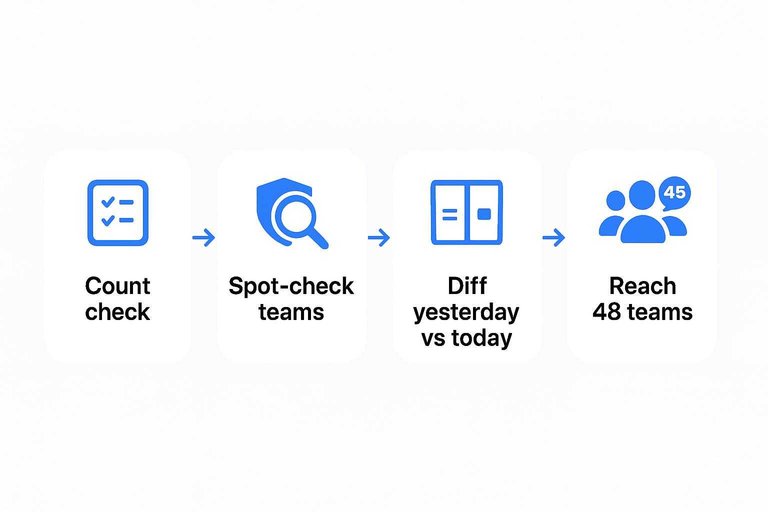
Do basic hygiene every time you refresh: run a count check against your target finals size, spot-check a few teams against FIFA’s official documents, and diff yesterday’s list against today’s so additions are explicit. When you reach 48 for a given edition and your spellings still match your FIFA-anchored base list, you finally have a checklist you can scan for markets without guessing what got left out.
Phantom teams from PDFs
PDFs are built for layout, not data, so a PDF extraction artifact—garbage characters or footnote markers introduced when you copy/parse a PDF—can turn a real team code into a fake one and silently drop matches.
- Start from a canonical list. Pull team names/codes from FIFA’s official Squad Lists PDF on fdp.fifa.org, not from pasted schedule rows.
- Normalize before you parse. Trim whitespace, collapse multiple spaces, and strip non-printing characters.
- Enforce code shape. If you expect 3-letter team codes, require exactly
[A–Z]{3}after cleanup; reject anything else. - Whitelist validation. Only accept codes that exist in your canonical FIFA list; everything else becomes a “needs review” row.
- Run end-to-end checks. Diff today vs yesterday, and spot-check a few rows against the original PDF on digitalhub.fifa.com.
If it fails shape + whitelist, it’s not a new team—it’s bad text.
Unverified market coverage
Run this scan the same way every time, until every team in your cleaned list returns at least one team-linked market. MarketsPrediction is the fastest place to do it because you can search a team once across All Platforms and then sort by volume/liquidity to see what’s actually tradable.
-
Create a per-venue query bundle (one row per team). For each venue, store the exact label you expect plus 3–5 search terms (your “query patterns,” meaning the exact strings you’ll type) like: canonical name, diacritic-free name, common alternate name, and team code.
-
Scan with escalating queries, not one search. For each team, try: exact name → name without punctuation/diacritics → alternate name → team code. Stop only when you get a clearly team-specific market result.
-
Do a hard count check. A “count check” is just comparing totals: number of teams in your list vs number of teams that returned ≥1 market. Any difference is a known coverage gap, not a “maybe.”
-
Reconcile every zero-hit team by going to the source venue once. If the aggregator shows nothing, search the venue directly (for example, Polymarket) and record the venue’s real label as a new alias in your crosswalk.
-
Re-run after roster/field-changing events. Qualification endpoints and the Intercontinental play-off tournament are when new team markets appear; rerun the full scan and confirm the count returns to full coverage.
Build a list that matches markets
If your goal is to find every team-linked contract, don’t start with a search-result “all teams” list—start by locking the edition and treating FIFA’s official squad lists (sanity-checked against the match schedule) as your source of truth. Then assume labels will drift across venues: make a team alias map for spellings/diacritics and keep a per-venue crosswalk so you’re not betting coverage on a single code. From there, the checklist earns its keep only when it passes validation: no PDF garbage, no stale qualifier snapshot, and a hard count check against the finals field. Do that, and your scan stops being guesswork—you’ll know exactly which teams (and markets) are missing, and why.
Frequently Asked Questions
- When people search “all team in fifa world cup,” do they mean every country ever, or the teams in a specific World Cup edition?
- Not the same thing: “all-time” means every national team that has ever appeared at a World Cup finals, while an edition-specific list means the finals field for one tournament (like 2026). For prediction-market scanning, you want the edition-specific finals field because that’s the set contracts are written against.
- What’s the most reliable source of truth for an “all team in fifa world cup” list I can actually use for data joins?
- Use FIFA’s official Squad Lists PDFs hosted on fdp.fifa.org because they publish the team name alongside a three-letter abbreviation in one canonical place. Treat that spelling as your primary key and store other spellings as aliases.
- How can I sanity-check that my World Cup team list matches real fixtures (and isn’t missing teams)?
- Cross-check your team set against FIFA’s official match schedule documents hosted on digitalhub.fifa.com and confirm every team you expect appears in the fixture list. If a team never appears in the schedule, your list is either wrong-edition or has a label mismatch.
- Why do World Cup team names fail to match across sites and prediction markets (for example, Curaçao vs Curacao)?
- Because sources disagree on diacritics, punctuation, and official vs common country forms, so the same team can be published under multiple strings across FIFA documents and market venues. The fix is an explicit alias map that links every variant back to one canonical name from the FIFA squad list.
- How do I verify I have market coverage for every team once my “all team in fifa world cup” list is cleaned?
- Run a repeatable scan where every team must produce at least one team-linked market result, then do a hard count check so any zero-hit teams become an explicit coverage gap to resolve. MarketsPrediction can speed this up by letting you search each team across All Platforms and then filter/sort to find where it’s actually tradable.