
 Best Platforms
 Live Odds







CoinRithm Prediction Markets vs MarketsPrediction for Event Discovery
A head-to-head comparison that settles whether CoinRithm or MarketsPrediction is the better fit for event discovery — a four-step scan→shortlist→verify-equivalence→choose-venue workflow, a “what counts as a source” breakdown, side-by-side discovery surfaces, freshness signals and metric definitions, plus a 10‑minute decision matrix with live test steps.
You’re trying to spot which prediction markets are actually worth your attention today without opening a pile of tabs and piecing the story together yourself. Get this wrong and you end up chasing stale numbers, mistaking a headline price for something you can trade, or comparing “volume” that isn’t measured the same way across venues.
This comparison gives you a practical discovery workflow, a failure-mode checklist, and a quick live test you can run on a single event to see which product helps you verify equivalence, read liquidity and spreads, and pick a venue with an executable price.
Discovery Workflow
Event discovery is the process of finding which markets are active and interesting right now—and where you can trade them at actionable size. A good discovery page is less “what’s trending” and more a workflow you can trust.
Four-step workflow
Scan: Start wide, then narrow fast. Your scanner should expose quick ways to slice the universe (by platform/category) and an explicit freshness cue; a site-wide “Last updated” timestamp is the minimum for deciding whether “trending” reflects now or an earlier cache.
Shortlist: Pick a handful of candidates based on signals that survive first contact with execution. Don’t rely on a single headline “odds” number; compare bid/ask (the best currently available buy price and sell price—the executable range) and the spread (ask minus bid—the immediate cost to enter/exit at the top of book). A “Best Spread” callout is useful here, as long as you can click through to the venue to confirm the quoted prices.
Verify equivalence: Cross-platform matching (the system’s mapping of “the same real-world question” across venues) is where aggregators can mislead you. Before you treat two rows as comparable, check resolution criteria (the exact rules/source-of-truth and timing that determine settlement), and confirm the contract wording is truly the same bet.
Choose venue: Only after equivalence do you optimize for where to trade. Use midprice ((bid + ask) / 2—a convenience estimate that may not be directly executable) as a comparison aid, but decide with liquidity (depth) (how much you can trade near the current price without moving it materially) plus spread and price impact—not just “volume,” which can reflect turnover from arbitrage, hedging, maker rebalancing, or incentives. And for choosing a venue for a specific trade, execution quality (depth, spreads, fee-adjusted pricing, and resolution-rule match) is the directly actionable comparator—not which venue looks “most accurate” in the abstract.
Failure-mode checklist (why “trending” lies)
- Stale or cached data: If the page warns data can be delayed/cached/incomplete, treat “trending” as a lead, not a fact—verify the timestamp and click through to the underlying venue.
- Non-comparable 24h volume window: “Volume (24 h)” only compares cleanly when the time basis matches (trailing 24 hours vs latest completed day). Prefer tools that disclose per-source windows, and treat cross-venue volume ranks as unreliable unless you’re also sanity-checking liquidity for a standardized trade size.
- Thin-book headline odds: A tight-looking price can be non-executable. Check bid/ask and spread, then sanity-check depth; a top-of-book quote without size is marketing.
- Mismatched resolution rules: Two markets can look identical and still settle differently. If the aggregator admits matching can be wrong due to materially different resolution criteria, treat resolution text as part of your pre-trade checklist, not fine print.
Four-step workflow
Event discovery is the process of finding which markets are active and interesting right now—and where you can trade them at actionable size. A good discovery page is less “what’s trending” and more a workflow you can trust.
Scan: Start wide, then narrow fast. Your scanner should expose quick ways to slice the universe (by platform/category) and an explicit freshness cue; a site-wide “Last updated” timestamp is the minimum for deciding whether “trending” reflects now or an earlier cache.
Shortlist: Pick a handful of candidates based on signals that survive first contact with execution. Don’t rely on a single headline “odds” number; compare bid/ask (the best currently available buy price and sell price—the executable range) and the spread (ask minus bid—the immediate cost to enter/exit at the top of book). A “Best Spread” callout is useful here, as long as you can click through to the venue to confirm the quoted prices.
Verify equivalence: Cross-platform matching (the system’s mapping of “the same real-world question” across venues) is where aggregators can mislead you. Before you treat two rows as comparable, check resolution criteria (the exact rules/source-of-truth and timing that determine settlement), and confirm the contract wording is truly the same bet.
Choose venue: Only after equivalence do you optimize for where to trade. Use midprice ((bid + ask) / 2—a convenience estimate that may not be directly executable) as a comparison aid, but decide with liquidity (depth) (how much you can trade near the current price without moving it materially) plus spread and price impact—not just “volume,” which can reflect turnover from arbitrage, hedging, maker rebalancing, or incentives. And for choosing a venue for a specific trade, execution quality (depth, spreads, fee-adjusted pricing, and resolution-rule match) is the directly actionable comparator—not which venue looks “most accurate” in the abstract.
Failure-mode checklist
- Stale or cached data: If the page warns data can be delayed/cached/incomplete, treat “trending” as a lead, not a fact—verify the timestamp and click through to the underlying venue.
- Non-comparable 24h volume window: “Volume (24 h)” only compares cleanly when the time basis matches (trailing 24 hours vs latest completed day). Prefer tools that disclose per-source windows, and treat cross-venue volume ranks as unreliable unless you’re also sanity-checking liquidity for a standardized trade size.
- Thin-book headline odds: A tight-looking price can be non-executable. Check bid/ask and spread, then sanity-check depth; a top-of-book quote without size is marketing.
- Mismatched resolution rules: Two markets can look identical and still settle differently. If the aggregator admits matching can be wrong due to materially different resolution criteria, treat resolution text as part of your pre-trade checklist, not fine print.
What counts as a “source” (and what “Top markets by volume” really means)
A “source” is the upstream place the row’s numbers come from. If sources are only tradable venues, “Top markets by volume” is a trading watchlist. If sources also include forecasting/play-money sites, it becomes a broader “what questions are getting attention” index.
| Use case | Better fit | What counts as a “source” | How “Top markets by volume” reads |
|---|---|---|---|
| Find markets you can execute on now | MarketsPrediction | Trading platforms it quick-filters (Plus500, Kalshi, Polymarket, Foregate) | “Most traded on these venues”; platform inclusion can be influenced by compensated offers |
| Broader event discovery (trade + forecast) | CoinRithm | Mix of venues and forecasting communities (e.g., Polymarket, Kalshi, Metaculus, Manifold Markets, Smarkets, Robinhood, Futuur, Gemini) | “Most active across a mixed universe”; it discloses per-source volume bases and flags “not directly comparable” cases |
| You want volume rankings you can compare cleanly | CoinRithm | Same as above, but with source-aware normalization where possible | “Comparable only when the source windows match”; CoinRithm also warns third‑party data may be incomplete/error‑prone and some features are limited without JavaScript |
If you treat “source” as “place I can click and trade,” the narrower definition is a feature—not a bug: it keeps the list closer to an actionable cross-venue watchlist instead of a blended attention metric.
Discovery Surfaces
MarketsPrediction (MP) is built around a few high-signal entry points you can click through fast; CoinRithm offers fewer “promo-style” surfaces but more programmatic ways to slice the market universe.
| Discovery surface | CoinRithm | MP | Edge (per surface) |
|---|---|---|---|
| Top-by-volume lists | Hub-style rankings | “Top Markets By Volume”; per-platform “Top 30” views | MP |
| Trending (homepage module) | Not the primary landing surface | “Today’s Trending Market” module | MP |
| Filters for narrowing | Web experience can be JS-dependent (search/personalization may be limited without JavaScript) | “All Categories” + “All Platforms” filters | MP |
| Per-event venue rows | Cross-venue matching + consensus available via API | Per-platform comparison row on event pages | MP |
| One-click execution handoff | Links out to venues | “Buy Yes / Buy No” links (via redirect/tracking) | MP |
| “Best price to act now” cue | referenceProbability available for matched open events (API) | “Best Spread” callout on event pages | Split |
| News-adjacent discovery | Not a core surface here | “Latest News” feed with links/summaries | MP |
| API-driven discovery | Keyless JSON API; events endpoint supports filters/sorting (including “trending”); limit 1–100 (default 20) | Not a core surface here | CoinRithm |
| Promo/offers as a discovery path | Not a primary surface | Promo codes/links; terms disclose compensation may influence which platforms/offers appear and placement | MP |

Freshness Signals
A freshness signal is the page’s “as-of” timestamp (when it says the numbers were last refreshed). The trust question is whether that timestamp applies globally, or whether each source carries its own measurement window and uncertainty flags.
| Signal | MarketsPrediction (MP) | CoinRithm | Trust read |
|---|---|---|---|
| Top-level freshness cue | Site-wide “Live Data” last updated: September 19, 2026 at 2:52 AM UTC | Hub “Market Overview” as-of: 2026-09-19 08:23 UTC | Split: both explicit |
| Volume window disclosure | “Volume (24 h)” shown in app stats | Per-source bases shown on hub | Edge: CoinRithm |
| Comparability warnings | Single label, no basis note | Flags “Not directly comparable” where needed | Edge: CoinRithm |
| Concrete non-comparable example | — | Robinhood shown as “Latest completed day” and “Not directly comparable across venues” | Edge: CoinRithm |
| What the numbers are | Polymarket “Volume (24 h)” and “Total Liquidity” shown as platform metrics | Normalizes fields where possible, but settlement rules and access limits stay source-specific | Edge: CoinRithm |
| What happens when data is imperfect | Describes itself as an information/analytics site; not an exchange and does not execute trades | States it does not guarantee completeness, uninterrupted availability, or error-free third-party data | Edge: CoinRithm |
| Matching uncertainty cues | Not expressed as a graded on-page signal | Resolution-status indicator with tiers of settlement evidence | Edge: CoinRithm |
If you’re using volume, liquidity, and best spread as measurement systems (not just numbers), per-source windows plus explicit “not comparable” flags are the clearest trust win.
CoinRithm Advantages
CoinRithm is the better discovery tool when your “scan” looks more like research: you want to understand what a market means across venues, not just what’s hot on one list. Use it when you’ll actually click through, verify equivalence, and maybe simulate a position before you trade.
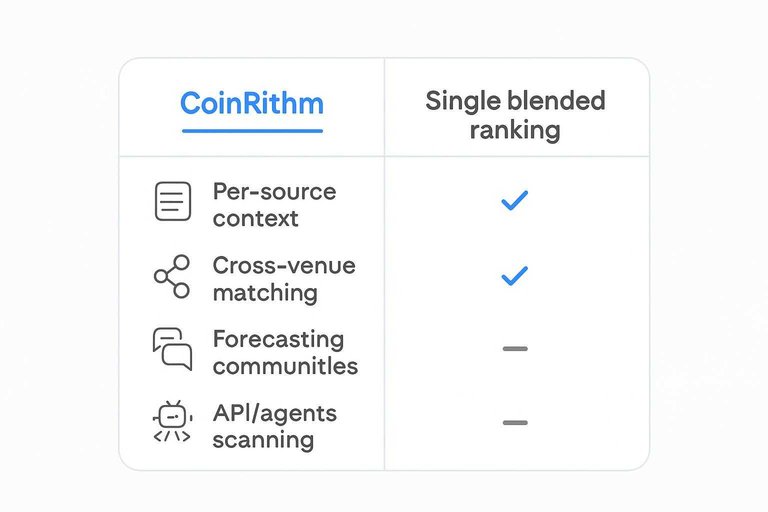
- You care about per-source context, not a single blended ranking. CoinRithm publishes “24h volume by source” with explicit window notes—e.g., Kalshi $57M vs Polymarket $38.6M—and it will flag cases like Robinhood $9.6M as “Not directly comparable across venues.”
- You want cross-venue matching with settlement evidence. It aggregates and normalizes fields where possible, but keeps settlement rules source-specific, and it shows a resolution-status indicator with tiers of settlement evidence.
- Your discovery universe includes forecasting communities. Coverage includes venues plus communities like Metaculus and Manifold Markets, which helps when you’re looking for questions gaining attention before liquidity follows.
- You discover via API/agents, not just pages. The CoinRithm Prediction Markets Data API (/api/prediction-markets/*) supports filterable, scriptable scanning; its keyed agent API budget is 120 requests/min.
- Limitations you have to accept. JavaScript-off can limit widgets/search, it doesn’t guarantee error-free third‑party data, coverage can vary by source/jurisdiction, and pricing/paid gating isn’t publicly listed (see https://www.coinrithm.com/en/prediction-markets rel=“nofollow”).
MarketsPrediction Strengths
Use MarketsPrediction when your discovery habit is “scan tradable venues fast, then click out to execute,” and you want the UI to behave like a watchlist rather than a research workspace. In its Terms of Use, it describes itself as an independent information, comparison, and analytics website and says it does not execute trades.
-
Fast venue-first scanning (tradable by default). The navigation is oriented around browsing markets by platform/category so you can narrow to where you actually intend to place an order, not just where people are discussing a question—useful when the goal is quick cross-platform odds checking rather than long-form analysis.
-
Trend and volume surfaces for first-pass triage. “Top Markets By Volume” and the “Today’s Trending Market” module make “start with activity” the default, which can be a practical way to spot where liquidity is concentrating—but remember volume can reflect turnover (arbitrage, hedging, maker rebalancing, incentives) rather than clean “conviction.”
-
Filters that match real scanning moves. “All Platforms” + “All Categories” is the right primitive if your workflow is “show me politics on Kalshi” or “crypto on Polymarket,” without building queries or tooling.
-
Execution-oriented cues on event pages. The “Best Spread” callout helps shortlist where the current executable prices are most attractive, but it’s still a lead—you must click through and confirm size/depth.
-
Platform comparison tables and stats dashboards. If you choose venues operationally (deposit methods, minimum deposit, payout speed), the tables help; and the site-wide stats (e.g., Weekly Notional Volume—$5.4B—and Open Interest—$103.5B, meaning outstanding positions) plus breadth/throughput metrics like Active Markets—13.2M—and Weekly Transactions—119.1M provide quick context.
Concrete limitations: it’s explicitly an analytics site and does not execute trades, and volume-first discovery can over-rank churn versus tradable opportunity—so weight liquidity (spread + depth + price impact) alongside volume, ideally at a standardized trade size.
Choose in 10 minutes
MarketsPrediction (MP) if you want a venue-first watchlist you can click out from; CoinRithm if you want source-aware research (CoinRithm is not a broker and does not resolve markets, and it includes a paper-trading sandbox). MarketsPrediction describes itself as an information/analytics site and says it does not execute trades.
Decision matrix
| Your goal | Must-have signals on the page | Winner |
|---|---|---|
| Place a real order now | Clear per-venue links + bid/ask + tight spread | MP |
| Validate “same event” across venues | Resolution criteria visible + matching confidence cues | CoinRithm |
| Trust the “volume” comparison | Per-source time window + “not comparable” flags (e.g., Gemini $280.3K with a trailing-24h window) | CoinRithm |
| Keep discovery simple | Fewer research knobs; scan by platform/category | MP |
Live test (10 minutes)
- Pick one event that appears in both tools right now (use the top row you see).
- Open each venue page and confirm the resolution criteria match.
- Compare executable pricing: bid/ask and the spread, not a headline mid.
- Check freshness: timestamps, stated windows, and any “lagging source” cues.
- Click one venue link from each tool and time how fast you find your next candidate.
If either tool can’t pass step 2 or 3, don’t stack it—drop it.
Pick one tool, then verify
If your daily job is to scan tradable venues fast and click straight to an executable price, MarketsPrediction is the better default—just treat “trending” and “volume” as leads until you’ve checked bid/ask, spread, and depth on the venue itself. Reach for CoinRithm when your bigger risk is false equivalence or misleading cross-venue volume comparisons and you want the extra source-aware context (plus matching and settlement-evidence cues) before you act. Either way, don’t decide by vibes: take one event you see right now, confirm the resolution criteria match across venues, then compare the executable range (not the mid); if a tool can’t pass those checks, drop it instead of stacking more tabs.
Frequently Asked Questions
- Do CoinRithm or MarketsPrediction let you place trades directly from their event discovery pages?
- No—both are discovery/analytics layers, not trading venues. MarketsPrediction’s Terms say it is not an exchange or broker and does not execute trades, so you still place orders on the underlying platform you click through to.
- Is CoinRithm’s “resolution status” the same thing as the market’s official settlement on Kalshi or Polymarket?
- No—CoinRithm is not a broker and does not resolve markets; it aggregates data and shows a resolution-status indicator with tiers of settlement evidence. Always read the underlying venue’s resolution rules as the source of truth for settlement.
- How do I verify two “same event” rows are actually equivalent across platforms when an aggregator matches them?
- Open the venue links and compare the full contract wording, the resolution criteria/source-of-truth, and the exact cutoff time for settlement. MarketsPrediction’s Terms warn matching can be wrong and markets can differ in resolution criteria, so treat any match as a lead until you confirm it on the venue pages.
- Should I use “Volume (24 h)” or “Total Liquidity” to decide which market is tradable right now?
- Use both: “Volume (24 h)” signals activity, while “Total Liquidity” indicates how much capital is sitting in the market; neither replaces checking executable bid/ask and depth on the venue. For example, MarketsPrediction shows Polymarket “Volume (24 h)” as $58,614,643 and “Total Liquidity” as $295,970,690 (as of 2026-09-19).
- Can I legally scrape or bulk-export CoinRithm or MarketsPrediction data for my own dashboard or trading bot?
- Check the Terms of Use before you build anything: MarketsPrediction’s Terms position it as an analytics site aggregating publicly available data, and terms commonly restrict scraping, bulk extraction, and redistribution. If you need automation, use the provider’s permitted interfaces and document your use case against the Terms.