
 Best Platforms
 Live Odds






How to Compare Next US President Odds: 9 Quick Checks
A nine-point checklist that settles how to compare “next U.S. president” odds across platforms — worksheet setup, “next”/election-year/market-type definitions, settle-clause and source-agency checks, executable bid/ask and spread snapshots, probability-shaped fee math, settlement-risk and eligibility screens, plus a quick J.D. Vance demo table.
You’re trying to figure out who the market thinks will be the next U.S. president, but every site seems to show a different percent. If you treat those headlines as interchangeable, you can end up buying a contract that settles on a different definition, crossing a spread you didn’t price in, or giving back your “edge” in fees.
This checklist gives you nine quick checks to normalize the meaning first, then compare the executable price (not the displayed one), then adjust for spread, fees, and settlement risk—so the cross-platform “disagreement” you’re reacting to is real.
Set up worksheet
Your goal is a one-page sheet that forces you to compare like with like. Every later check should end with a filled cell you can point back to: wording, prices you can actually hit, and the rule that settles it. If a platform won’t let you paste a link or capture the exact wording, it doesn’t get compared.
Define “next”
Write the exact cycle in plain English at the top of the sheet: “Next U.S. president for the 2028 election cycle” (or whatever you mean).
The next U.S. presidential election is Tuesday, November 7, 2028, so “next” should not float between 2024 leftovers, 2028, and “next inauguration.”
Lock election year
Pick one market year and treat it as a hard filter.
- Write the year at the top of the worksheet (example: 2028).
- Only collect markets whose title and rules match that year.
- Put a big “NO” mark on anything for a different year.
- Don’t carry candidates across years without re-checking the market.
Choose market type
Circle exactly one market type before you look at any prices.
- Election winner (defined winner, not vibes)
- Electoral-college winner (explicitly EC-based)
- First person inaugurated (for the term)
At least one U.S.-presidential “winner” framework explicitly says the winner is determined by electoral college votes, not popular vote, and Kalshi’s “inaugurated” framing can exclude an acting/temporary inauguration from the payout criterion.
Collect market links
Open the same event on each venue and make it auditable.
- Open the market page for your chosen market type and year.
- Copy the URL and paste it into your worksheet.
- Copy any market ticker/ID shown and paste that too.
- Save a snapshot of the contract wording text you’re relying on.
Create columns
Build your worksheet so every platform entry can be checked later without re-clicking.
| Group | Worksheet columns to include | What you copy | Why you need it |
|---|---|---|---|
| Identity | Platform, market link/ticker | Name + URL/ID | Reproducible comparisons |
| Contract | Contract wording, resolution method, eligibility notes | Exact rules text | Prevents “same question” errors |
| Execution | Executable bid/ask, spread, update time | Best bid/ask + timestamp | Displayed price can mislead |
| Activity/Cost | Fees, volume/liquidity | Fee page + metrics | Separates price from friction |
Two practical gotchas to design for: some venues display a midpoint price that you won’t necessarily trade at, and some binary orderbooks can be presented as bids-only because a YES bid at X is equivalent to a NO ask at (100−X).
Checks 1–3: Meaning
Before you compare “next us president” odds, normalize what each contract pays out on. Two markets can look identical in a list of percentages while settling on different real-world events. Your worksheet needs the exact settlement trigger, written in plain English, so you can audit every price you compare later.
Check 1: Settle clause
- Open the market’s Rules/terms panel and find the settlement sentence.
- Write down the exact trigger: “wins the election” or “first person inaugurated.”
- Note any “determined by…” clause (who decides, and by what process).
- Paste (or snapshot) the exact wording into your worksheet.
Write rule summary
Write one sentence per platform that restates the payout criterion in plain English.
Do it even when the brand name looks the same, because “Polymarket US” is a separate CFTC-regulated entity and its contract language can differ from Polymarket’s international platform. Keep your sentence tight enough that you can re-read it during a fast price check without reopening tabs.
Check 2: Source agencies
You’re not recording “who will win,” you’re recording what counts as official.
- Copy the source hierarchy order (primary/secondary/tertiary).
- Record that media projections are excluded.
- Record that exit polls and unofficial calls are excluded.
- For U.S. president, record: electoral college decides, not popular vote.
Check 3: Edge cases
Use a small scenario table to surface when two “next president” contracts diverge.
| Scenario | Polymarket US EWC wording points to | Inauguration-style wording points to | Worksheet note you write |
|---|---|---|---|
| Delayed certification | Wait for official authority | Wait for inauguration event | “Certification vs swearing-in” |
| Winner never inaugurated | EC-based winner still relevant | Different person can qualify | “Can diverge here” |
| Disputed outcome on election night | Excludes unofficial calls | Wording varies; check trigger | “No media-call settling” |
| Succession before inauguration | Check if “takes office” required | First sworn-in controls | “Succession sensitivity” |
Checks 4–6: Price
Check 4: Displayed price
Some “next us president” markets show a headline price you cannot trade.
On Polymarket, the displayed price is the midpoint of the best bid and best ask, but your actual fill is at the ask when you buy and at the bid when you sell.
So your worksheet should treat the headline as a UI convenience and store executable prices instead.
Check 5: Bid/ask pull
Pull the top-of-book for YES so you’re comparing tradable odds, not marketing.
- On each venue, locate the order book for the specific contract you wrote down.
- Write down the best YES bid and the best YES ask (the prices you’d hit right now).
- On Kalshi, if the book is shown as bids-only, record the best YES bid and best NO bid.
- Compute the YES ask as: YES ask = $1.00 − (best NO bid), then write it down.
- Add a timestamp beside the prices so you can re-check later.
Check 6: Spread snapshot
A spread is a real cost you pay to get in and out, even before fees.
- Record YES bid − YES ask spread.
- Record size at best bid.
- Record size at best ask.
- Screenshot the top-of-book.
- Treat wide spreads as non-odds.
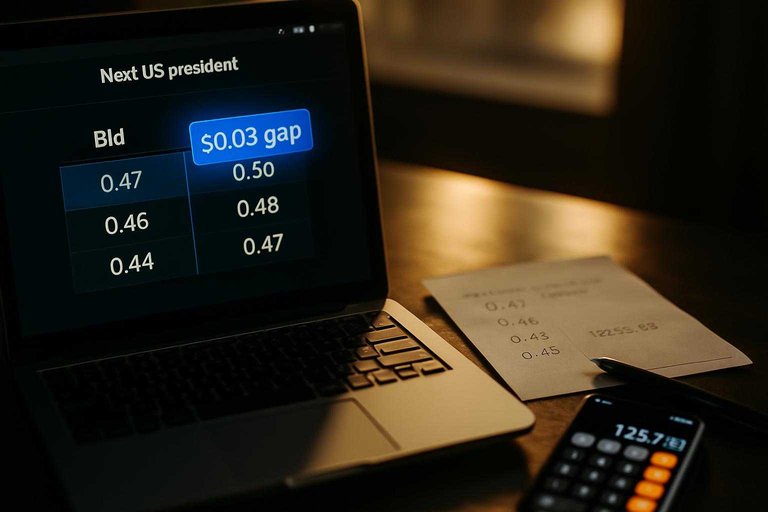
Kalshi’s own order book example shows a best bid of $0.71 and best ask of $0.74 for YES; that $0.03 gap is the difference between “quoted” and “executable.”
Use MarketsPrediction
Use MarketsPrediction when you want the same “next US president” event lined up across venues before you do the book math.
- Find the event and switch to the cross-platform view.
- For each platform shown (e.g., Kalshi, Polymarket, Plus500, Foregate, Trendle), copy the implied odds.
- Record the volume/liquidity figures shown for each platform on your worksheet.
- Copy the “Last updated” timestamp so your comparisons are time-anchored.
- Click through to the venue pages to pull the executable bid/ask and top-of-book size.
If you need full depth or you’re about to place orders, go straight to the native order book.
Checks 7–8: Fees
A “best odds” screenshot is unfinished until you convert it into a net, executable probability. Both Kalshi and Polymarket document probability-shaped fees that scale with p×(1−p), so the same 1–2¢ price edge can disappear once you account for fee drag.
Put the fee math right beside your executable bid/ask so you’re comparing the trade you can actually place.
Check 7: Fee math
Use one row per venue and write the fee rule in the same algebra each time.
| Platform | Who pays | Fee formula | Rounding |
|---|---|---|---|
| Kalshi (general event contracts) | Trader | round up(M × 0.07 × C × P × (1−P)) | Round up |
| Polymarket (Politics, international) | Taker only | C × 0.04 × p × (1−p) | Not specified |
If you don’t write the formula, you’ll keep “finding” edges that aren’t tradable.
Where fees peak
Both fee models multiply by p×(1−p), which is largest near p=0.50. That’s why fee drag matters most on coin-flip pricing, and matters less on longshots and heavy favorites.
Check 8: Other charges
Fees aren’t only “per fill,” so add these yes/no checks to your worksheet.
- Confirm Kalshi has no settlement fee or membership fee.
- Confirm Kalshi card deposits max out at a 2% fee.
- Confirm Polymarket makers are never charged fees.
Check 9: Settle risk
Two “next us president” markets can look interchangeable while sitting under different rulebooks. Your worksheet should capture whether you’re trading on Polymarket US (a separate Commodity Futures Trading Commission (CFTC)-regulated entity) or Polymarket’s international platform (not regulated by the CFTC), plus what happens when resolution is contested. Then add the last filter: whether you’re even allowed to participate on the venue you’re comparing.
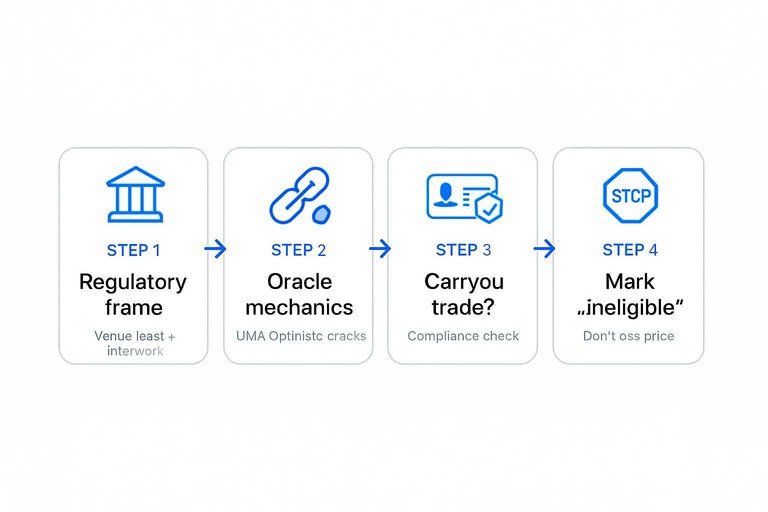
Regulatory frame
Treat the venue label as part of the contract, because it changes the rulebook you’re relying on.
- Polymarket US: separate CFTC-regulated entity (QCX LLC d/b/a Polymarket US)
- Polymarket international: not regulated by the CFTC
- Kalshi: rulebook-driven venue; record its trading-prohibition rules
If you don’t separate these on the sheet, you’ll compare “same market” that isn’t the same trade.
Oracle mechanics
On Polymarket, resolution runs through the UMA Optimistic Oracle: someone proposes an outcome with a bond, there’s a challenge period, and disputes escalate to UMA’s Data Verification Mechanism (DVM) for UMA token-holder voting. Proposing a resolution requires a $750 bond, and Polymarket warns you can lose the full bond if you propose too early or your proposal is unsuccessful. That optimistic-oracle path is a different settlement-risk profile than a single rulebook-driven determination, so your venue-to-venue “odds gap” may be partly a risk discount rather than a pure price edge.
Can you trade?
Run this compliance check before you treat any venue as “available liquidity.”
- Identify the contract’s source agency and write it into your worksheet.
- If you’re an employee of that source agency, stop: you’re prohibited from participating.
- If you have material non-public information about the contract, stop: you’re prohibited.
- If you have the ability to influence the outcome of the contract, stop: you’re prohibited.
- Mark the venue as “ineligible” and do not use its price in your comparison.
A price you’re barred from trading is not part of your real odds set.
Quick Vance demo
A one-glance “next us president” odds gap on J.D. Vance can vanish once you sanity-check what each page is actually displaying.
| Source page | Headline figure #1 | Headline figure #2 | What normalization changes |
|---|---|---|---|
| Kalshi “2028 U.S. Presidential Election winner?” | Yes 22¢ | No 80¢ | Two headlines can conflict |
| Kalshi “2028 U.S. Presidential Election winner?” | $63,912,165 volume | Yes 22¢ | Activity doesn’t fix pricing |
| Polymarket “Presidential Election Winner 2028” | 25% headline | $697M volume | Big volume, still headline |
| Polymarket “Presidential Election Winner 2028” | 25% headline | $63M liquidity | Liquidity ≠ normalization |
Make the odds comparable before you shop for the best number
- Standardize the question. Lock the election year, define what “next” means for your bet, and confirm the market type so you’re not comparing different outcomes.
- Read the settlement mechanics. Pull the settle clause, list the source agencies, and write down the edge cases that would flip a close call.
- Compare what you can actually trade. Ignore headline percentages until you’ve captured the bid/ask you’ll hit, the spread snapshot, and any fee math that changes by price.
- Price in settlement risk and eligibility. Treat regulatory/oracle resolution and “can you trade?” constraints as part of the odds.
- Then pick your venue. Use MarketsPrediction to pull the same event across platforms and see live odds, volume, and liquidity side-by-side; if you already know you’ll trade on one specific venue and just need its current book and rules, going straight to that market page can be faster.