
 Best Platforms
 Live Odds





How to Find FIFA World Cup Team Markets: 6 Steps
This 6-step guide shows how to reliably find the right FIFA World Cup team markets across platforms — defining the exact edition and market family, building a team list with a name-variants sheet, using the MarketsPrediction All Markets workflow to surface candidates fast, verifying rule definitions before you trust a price, choosing a venue with price and access checks, and monitoring for new or updated contracts.
You’re trying to place a trade tied to a specific national team, but the obvious search terms keep sending you to the wrong contracts—or none at all.
Get this wrong and you don’t just miss opportunities: you can buy the wrong definition (winner vs advance vs match, regulation time vs extra time), get blocked at the venue you picked, or rely on a “price” that isn’t actually tradable. This guide gives you a repeatable six-step workflow to scope the exact market you mean, build copy/paste-ready name variants, find the live contracts, verify the rules, compare venues, and keep your list current as markets change.
Step 1: Define scope
If you start with “all team in fifa world cup,” you’ll drown in look‑alike contracts because “team” can mean “wins the tournament,” “gets out of the group,” or “wins this specific match.” A team market is a contract whose outcome is tied to a specific national team (for example, “Spain wins the tournament,” “Japan advances,” or a match contract where a team is one side).
One more trap: there isn’t a single, timeless list of “the World Cup teams.” The answer changes by edition. FIFA says the FIFA World Cup 2026 will be a 48‑team tournament across three host countries, starting June 11, 2026, with a record 104 matches. So any workflow that assumes “32 teams” is automatically pointing at older editions, not 2026.
Edition + market family
- Lock the edition first. If you mean 2026, write that down explicitly: it’s the expanded 48‑team World Cup (FIFA’s expansion decision was made by the FIFA Council, and the 2026 tournament details reflect that format).
- Anchor your team list source to FIFA’s 2026 documents. FIFA’s 2026 Final Draw procedures describe 12 groups of four and place the hosts—Canada, Mexico, and the USA—in pot 1.
- Pick one market family per team (don’t mix them). Decide whether you’re hunting: “team to win tournament,” “team to advance (group → knockout),” or “team in a specific match.” These are different market families, and searching a team name without this choice is how you pull unrelated contracts.
- Set a date window that matches the edition. For 2026, your search window should include markets that close around the tournament period that begins June 11, 2026.
Do this once, and every later search becomes “find the 2026 advance market for Team X,” not “find everything about Team X.”
Step 2: Build team list
Your searches are only as complete as your team list. For 2026, don’t start from “common” names or a media roundup—start from FIFA’s own list for the finals, and treat that spelling as your canonical key.
A practical source is FIFA’s Team Base Camp Training Sites release, which publishes the qualified team list using FIFA-style names (for example, “IR Iran” and “Korea Republic”). As of May 25, 2026, that same release shows how the 48 teams are distributed across base-camp countries: 39 teams based in the United States, 7 in Mexico, and 2 in Canada—another reminder you’re dealing with the expanded 2026 field, not an older 32-team edition.
Those two names are the warning label: if you only search “Iran” or “South Korea,” you will miss markets that copy FIFA’s wording verbatim.
Once you have the canonical names, expand each team into a small bundle of copy/paste search strings. You’re building for mismatch: FIFA naming vs common English vs platform identifiers.
When you start capturing platform identifiers, use the platform’s own label, not yours. A slug/ticker is just that identifier for an event/market (Polymarket often uses slugs in URLs; Kalshi uses tickers/series tickers to organize markets). Copy them exactly—one character off is a different market.
Name variants sheet
- Create one row per team, using the FIFA spelling as the “canonical” column. This is the name you’ll use to reconcile duplicates across platforms.
- Add a “common English” column for what you’d naturally type (e.g., “IR Iran” → “Iran”; “Korea Republic” → “South Korea”).
- Generate a “search string” column you can paste into site search: wrap names in quotes and join with OR.
- Example: (“Korea Republic” OR “South Korea”)
- Example: (“IR Iran” OR “Iran”)
- Add a “platform id” column as you encounter markets: paste the Polymarket slug or Kalshi ticker exactly as shown.
- Keep the sheet strict: if two platforms use two different labels for the same team, that’s a feature, not an error—store both, and search both.
Step 3: Find markets
This step is about coverage, not precision. Do one broad scanning pass to surface every candidate team market first, then you can open rules later.
Start by looking for a multi-outcome event—a single event page that contains many mutually exclusive outcomes (often one per team), rather than a single yes/no question. For World Cup team markets, that’s usually faster than hunting team-by-team contracts in isolation.
MarketsPrediction workflow
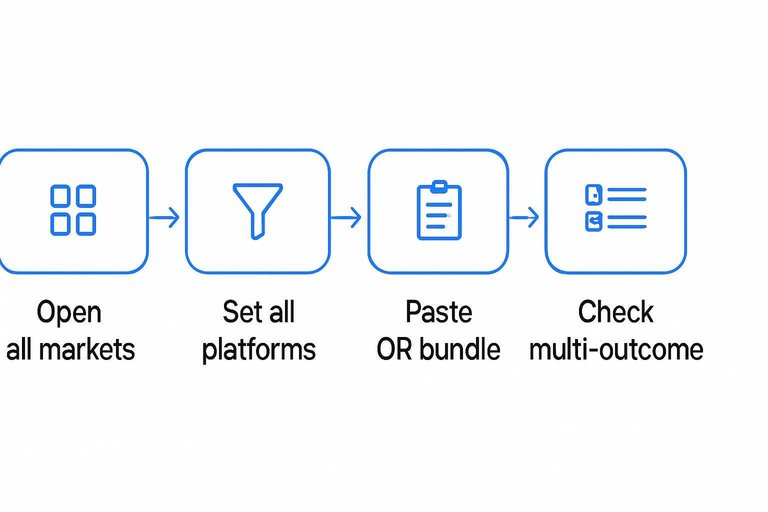
- Open All Markets, then switch the category to Sports so you’re not mixing in unrelated topics.
- Set All Platforms first, then re-run the same scan one platform at a time using the platform filter (or the per-platform Top 30 views) to catch platform-specific naming.
- Paste the team’s name-variant search string from Step 2 (your quoted OR bundle) and scan the results for World Cup “series” style events.
- Click into the most likely event pages and check whether they’re multi-outcome lists. On Polymarket, the “World Cup Winner” page is a multi-outcome event with 50+ outcomes and shows total volume ($4,327,988,660) plus a market open timestamp (Jul 2, 2025, 6:06 PM ET) and an end date.
- While you’re still scanning, note two triage signals for your sheet: the displayed activity (volume/liquidity on the aggregator) and the end date (so you don’t mix 2026 markets with older editions). Use the homepage Live Data “Last updated” timestamp (e.g., October 4, 2026 at 8:21 AM UTC) to sanity-check how fresh your scan is before you click out to any venue.
If you can’t find a team this way, it’s usually a naming mismatch—go back to the variant bundle and try again before you assume the market doesn’t exist.
For reference, this flow matches the UI on MarketsPrediction’s homepage.
Step 4: Verify rules
At this point you have candidates for “all team in fifa world cup.” Now you have to prove each contract is the definition you actually want to trade.
-
Open the contract on its native platform (not the aggregator card). You’re looking for the venue’s own market page, where settlement is defined.
-
Find the market rules block and identify the resolution source. The resolution source / source agency is the authoritative data publisher named in the rules that decides what counts as the official outcome for settlement. On Kalshi, the rules summary explicitly includes this outcome verification source, so you can see what reference they’ll use to confirm the result.
-
Confirm the time scope: regulation vs extra time vs penalties. Regulation time vs extra time vs penalties means whether the contract is defined over 90 minutes (+ stoppage) only, or includes extra time and penalty shootouts. Don’t assume a universal soccer convention: Kalshi’s soccer “finish method” specs separate outcomes like “advances via regular time,” “advances via extra time,” and “advances via penalty shootout,” with different resolution behavior for each.
-
Read the edge-case language, not just the headline source. Some World Cup rulesets can name FIFA as the resolution source but still include fallback wording like “a consensus of credible reporting may also be used.” That changes what happens if the official publication is delayed or ambiguous.
-
Check close time and what price you’re actually seeing. Rules live next to the trading cutoffs, so confirm when the market stops accepting trades. Also, on Polymarket, if the bid-ask spread is greater than $0.10, the UI shows the last traded price instead of the midpoint—so the “probability” on-screen may be a last print, not the current actionable middle.
If anything in steps 2–3 doesn’t match your intent, drop the market immediately—look-alikes are where bad trades come from.
Step 5: Pick venue
At this point you’ve found the right team market. Now decide whether the price is actually tradeable.
Start with Volume (24h)—how much has traded in the last 24 hours (a proxy for how active the market is right now)—then look at liquidity, meaning how much size you can trade without pushing the price around, and the bid-ask spread, the gap between the best buy and best sell prices.
Price and access checks
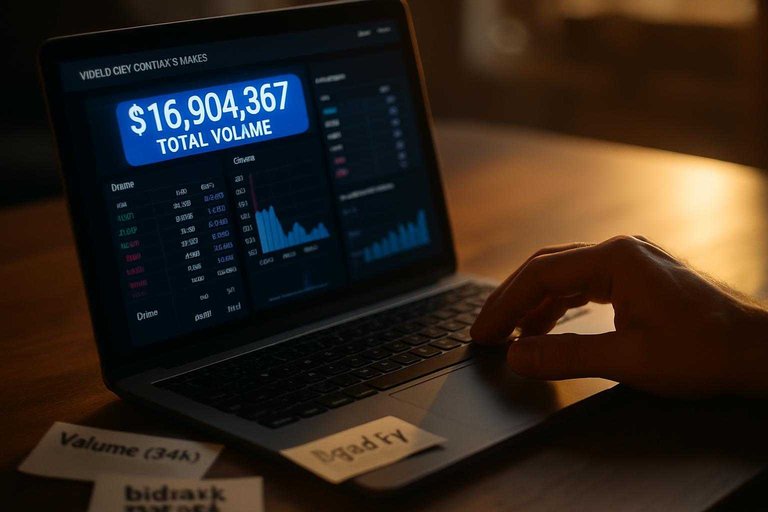
- Volume (24h) vs total volume: Total volume can be historical; Volume (24h) tells you if anyone is trading now. A World Cup page can show big lifetime numbers—e.g., Polymarket’s “World Cup: Team to advance to Knockout Stages” displays $16,904,867 total volume—without telling you today’s market is tight enough to enter and exit cleanly.
- Liquidity vs thin books: A “headline probability” can be one small trade. If the order book is thin, your own order becomes the market.
- Spread vs last-trade display: If the spread is wide, you’re paying for it twice (in and out). Treat a wide spread as a warning that the displayed price is not a dependable executable level.
- Contract constraints (Kalshi sizing/microstructure): Kalshi’s soccer “finish method” spec uses a $0.01 minimum tick size and a $25,000 Position Accountability Level per strike, per Member—details that matter if you’re trying to trade meaningful size rather than a tiny probe order.
- US access limits: Don’t pick a venue you can’t legally use. Polymarket’s Transparency page says Polymarket International (polymarket.com) is for users outside the United States, and that US traders (and other restricted jurisdictions) are prohibited from trading there.
If you can’t find tight activity (recent volume), real depth (liquidity), and a sane spread on a venue you can access, the right move is often to skip the trade—not to “trust” an illiquid probability.
Step 6: Monitor changes
-
Set a refresh cadence for your sheet. Re-run your searches on a schedule and append new slugs/tickers instead of overwriting old rows, so you can see what changed.
-
Watch for new fixtures creating new markets. As the match calendar fills in, new head-to-head markets appear even if your “all team in fifa world cup” outrights list looks complete.
-
Use “Last updated” timestamps as a gate. If the page you’re scanning isn’t recently updated, don’t treat missing teams/markets as “not listed yet.” Refresh first.
-
Re-check rules after any update. If a market’s rules page changes, re-verify close time and settlement definition before trading.
-
Track post-match settlement lag. Kalshi’s Help Center says most markets settle within a few hours (often about 3 hours), but it can take longer while waiting on finalized official data.
Trade the definition, not the label
If your searches keep landing on the wrong World Cup contracts, the fix isn’t a better keyword—it’s committing to a workflow that starts with the exact edition and market family, then searches with the team’s FIFA name plus the variants platforms actually use. Use the aggregator to surface the candidate multi-outcome events fast, but treat every price as provisional until you open the native market and confirm the resolution source, the time scope (regulation vs extra time vs penalties), and the close time. Then make the call based on what you can execute—recent activity, real depth, a sane spread, and a venue you’re allowed to use—or skip the trade rather than trusting an illiquid headline.
Frequently Asked Questions
- Which teams qualified for the 2026 FIFA World Cup, and how do I avoid missing team markets due to name mismatches?
- Start from FIFA’s official qualified-team list for the 2026 finals and use FIFA’s exact spellings as your “canonical” names, then add common variants (e.g., “IR Iran” vs “Iran,” “Korea Republic” vs “South Korea”) as search strings so you don’t miss platform-labeled contracts.
- How many teams are in the FIFA World Cup 2026, and why does that matter for “all team in fifa world cup” searches?
- FIFA World Cup 2026 is a 48-team tournament, so any workflow, spreadsheet, or market page built around “32 teams” is targeting an older edition and will leave out teams or point you at the wrong markets.
- Is a “team to win the World Cup” market the same as a “team to advance” market?
- Not the same: “team to win” settles only if the team wins the entire tournament, while “team to advance” settles based on reaching a specific stage (for example, making the knockout rounds), so you need to pick one market family before you search team-by-team.
- How can I quickly compare the best World Cup team prices across Kalshi, Polymarket, and other platforms without opening every site?
- Use a cross-platform aggregator like MarketsPrediction to filter to World Cup team events and compare prices alongside activity signals like Volume (24h) and liquidity before you click through to the native market rules.
- What’s the fastest way to find “all team in fifa world cup” outrights on a platform—team-by-team search or one multi-outcome event?
- Look for a single multi-outcome event that lists one outcome per team (an outright-style page), then export or copy the team outcomes from that page and verify each one’s rules on the native platform before trading.