
 Best Platforms
 Live Odds








Oddpool alternatives
A scenario-based collection of Oddpool alternatives—learn how to replace trend browsing, fast price comparison, niche discovery, liquidity tracking, and platform-fit checks using aggregators and platform-first options like MarketsPrediction, Kalshi, and Polymarket.
If Oddpool isn’t giving you the market visibility you need, you usually feel it first in the basics: you can’t tell what’s trending, where the best price is, or whether a market has enough liquidity to matter.
This roundup helps you pick an alternative based on how you actually use prediction markets—quick scanning vs. deep research, cross-platform comparison vs. sticking to one venue, and lightweight browsing vs. power-user workflows—so you can move from “looking around” to finding tradable opportunities faster.
Choose by scenario
Use the scenario that matches your intent, then pick the Oddpool alternative category that optimizes for it.
A good tool feels boringly obvious once you’re using it.
Just browse trends
You want a clean feed that surfaces what’s moving, without turning it into a research project.
Prioritize trending markets, volume signals, and navigation that stays out of your way.
If the homepage can’t answer “what’s hot” in seconds, it’s not a trends tool.
Compare prices fast
If you’re shopping for the best odds, speed matters more than deep context.
Prioritize cross-platform price views and one-click switching between venues.
- Cross-platform live odds in one view
- Fast platform toggles per market
- Clear price change indicators
- Consistent market matching labels
- Minimal clicks to trade
If you can’t compare without opening five tabs, you’re leaking edge.
Find niche markets
You’re hunting long-tail topics, where discovery is the whole game.
Prioritize category filters, search quality, and a taxonomy that doesn’t collapse everything into “Other.”
When filters are good, you stop browsing and start finding.
Track liquidity
You need to know whether a position is actually tradable at size.
Prioritize volume, order book depth signals, and activity over time.
- Volume and activity trend cues
- Order book depth indicators
- Recent trade frequency signals
- Market-level liquidity sorting
- Platform-specific liquidity views
Liquidity is the difference between a price and a position.
Verify platform fit
You’re not choosing a market first. You’re choosing the rails.
Prioritize deposit methods, minimums, payout speed, and access constraints before you care about odds.
If funding is friction, every “good trade” becomes hypothetical.
What to replace
Oddpool usually solves one core job: find prediction markets worth your attention, fast. You want breadth, freshness, and enough context to decide where to click.
Here’s a simple checklist you can use to compare any alternative fairly.
| Job-to-be-done | What “good” looks like | Quick test | Examples to try |
|---|---|---|---|
| Discover active markets | Fresh, relevant feed | New items today? | MarketsPrediction, Polymarket UI, Kalshi UI |
| Compare prices across platforms | Side-by-side odds | Same event, multiple venues | MarketsPrediction, manual multi-tab |
| Judge activity and liquidity | Volume and depth cues | Can you spot thin markets? | Polymarket, Kalshi, aggregators |
| Filter to your niche | Clear category/platform filters | Can you narrow in 2 clicks? | MarketsPrediction, platform search |
| Validate context quickly | Links, rules, resolution clarity | Can you confirm terms fast? | Platform market pages, aggregator links |
If an option fails two or more quick tests, you’ll feel it as “friction,” not a missing feature.
If you want to sanity-check what Oddpool’s core layer includes, its cross-venue search and volume ranking is a good reference point for what a replacement needs to cover. If you’re also evaluating whether Oddpool access is even available to you, see Oddpool pricing plans and access.
MarketsPrediction overview
Oddpool is one way to scan markets, but the real job is cross-platform discovery without tab-sprawl. You want live odds aggregation, a fast trending feed, sharp filters, and comparison tables that answer “where should I trade this?” in seconds.
MarketsPrediction is built for that workflow: it pulls live odds plus volume and liquidity across multiple platforms, then surfaces what’s moving via trending and “top markets” views. You can filter by category and platform, then sanity-check practical differences using platform comparison tables like deposit methods, minimum deposit, and payout speed.
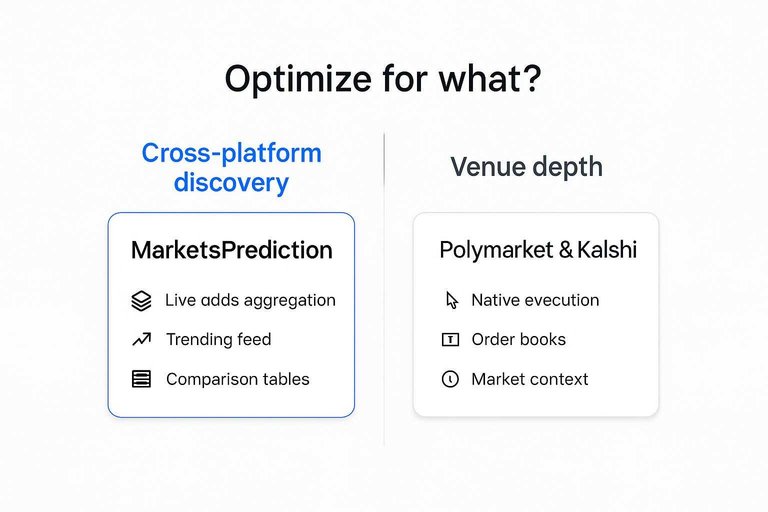
Other alternatives still matter, and some will beat it for specific jobs. Polymarket and Kalshi are best when you want to stay inside one venue with native execution, order books, and market context; pick them if you already know your platform and just need depth. Manifold Markets is stronger for community-driven questions and long-tail topics that may never appear on major venues; pick it if you value rapid market creation and social signal over cross-venue price shopping.
Your next step is to decide whether you’re optimizing for venue depth or cross-venue price discovery, because the tooling you need changes fast.
Discovery aggregators
MarketsPrediction
You use an aggregator when you want one scanning surface, not five tabs. It’s most useful when you care about price, activity, and where a market is actually tradable right now.
MarketsPrediction fits that workflow when you need cross-platform live odds on one screen, plus a trending feed to spot what’s heating up. It also helps when you’re comparing venues, with top-by-volume views and platform comparison tables for things like deposit methods and payout speed.
The practical edge is fewer context switches, which is where most “missed” markets happen.
Other aggregators
Sometimes you want a directory for discovery, not a trading dashboard. These tools shine when you value speed, context, or simplicity.
- Prediction Market Analytics — research context and platform metrics
- Manifold Markets — clean UX and fast browsing
- Metaculus — strong forecasting context and question quality
- Zoltar — tournament-style forecasting and track records
- Kalshi — direct, official market browsing
If you’re choosing, decide whether you’re scanning markets or studying forecasts.
Aggregator tradeoffs
Aggregators compress the surface area of the space. The trade is less depth per market and more dependence on how each platform exposes data.
Delayed updates can matter when odds move quickly, especially around breaking news. Coverage can be uneven, market details can be thinner than native pages, and “volume” may reflect different definitions across venues.
Treat any single dashboard as a lead generator, then verify on the source before acting.
Best for scanners
If your goal is speed, you need a repeatable loop. Keep one flow for daily scanning, and another for deeper research.
- Pick one aggregator view for daily trending and top-by-activity lists.
- Save 2–3 category filters you check every day.
- When something pops, open the native market page to confirm details.
- For deep dives, switch to research-heavy directories and forecasting communities.
- Track “why you clicked” so your filters improve over time.
Speed comes from a consistent routine, not from finding a perfect tool.
Platform-first options
If you prefer going straight to the venue, platform-first is the cleanest path. You pick a rulebook, a funding rail, and a market catalog, then trade inside that ecosystem.
Kalshi
Kalshi fits when you want a regulated, US-facing venue with a straightforward onboarding flow. It’s a good match for traders who value compliance clarity over maximum topic breadth.
Availability can be constrained by where you live, and the market menu won’t mirror crypto-native platforms. Expect different contract styles and resolution wording than you’d see elsewhere.
If “can I legally and cleanly access this?” is your first filter, start here.
Kalshi’s own overview of how Kalshi is regulated is worth skimming before you commit capital.
Polymarket
Polymarket fits when you want wide topical coverage and an active trading crowd. It’s often the fastest place to see new questions appear and attract liquidity.
Access can depend on your location and your comfort with on-chain mechanics. You’ll need a wallet, you’ll deal with crypto funding, and you’ll want to understand how settlement works in practice.
If you’re optimizing for range and activity, accept the wallet overhead upfront.
Other platforms
Beyond the big names, smaller platforms can be better for specific market types or communities. Treat them like specialists, not universal replacements.
- Foregate — best for straightforward categories and quick browsing.
- Predicta — best for simpler UX and beginner-friendly flows.
- Trendle — best for community-driven themes and discussion.
- Niche venues — best for unique contract formats.
If you keep accounts on several, a cross-platform scanner like MarketsPrediction can reduce tab-hopping.
Choosing a platform
Do a quick due-diligence pass before you fund any account. You’re buying into rules as much as odds.
- Confirm eligibility in your jurisdiction and the platform’s access policy.
- Choose a funding method you can repeat reliably.
- Check total fees across deposit, trading, and withdrawal.
- Verify liquidity and typical spreads on markets you’ll trade.
- Read resolution rules and support paths before placing size.
The platform that matches your constraints beats the platform with the prettiest homepage.
Where others win
Regulation needs
When compliance is the constraint, a regulated venue beats any aggregator on certainty. You get clearer eligibility, clearer dispute paths, and fewer surprises at withdrawal.
Imagine you’re trading from a jurisdiction with tight rules or employer restrictions. A regulated exchange or broker-style platform is often the only place where “am I allowed to do this?” has a durable answer.
The move here is simple: pick the venue that can say “yes” in writing, not “maybe” in practice.
Deepest liquidity
When you need size, speed, and tight spreads, the busiest single platform can be the right trade. Fragmentation hurts when you’re trying to get filled without moving the price.
High-volume venues tend to offer deeper order books, more counterparties, and better execution during news spikes. Aggregators help you spot activity, but they can’t create depth where none exists.
If slippage is your main cost, you follow the crowd.
Best research context
When you’re trading narratives, you need more than odds. You need sourcing, debate, and the ability to sanity-check assumptions in public.
- Metaculus for rationales and forecasting discussion
- Manifold Markets for community context and commentary
- Reddit/X for breaking links and crowd debate
- Specialized newsletters for curated domain framing
- Platform comment threads for trader reasoning
Odds move fast, but context tells you whether the move is noise.
Simplest onboarding
When you want to place a trade quickly, setup friction matters more than features. Some options win because they feel like a normal app.
- Manifold Markets for quick sign-up and instant participation
- Centralized crypto exchanges for fast funding rails
- Broker-like regulated venues for familiar KYC flows
- App-first platforms with simple wallets and UI
If you’re bouncing off setup, you’ll never reach the market edge.

Power-user workflows
When you’re running a system, you need automation hooks and monitoring primitives. Power users care about alerts, APIs, exportability, and repeatable scans.
Some single platforms expose better programmatic access, richer order-book data, and more reliable endpoints than discovery sites. In that case, a dedicated trading client or API-first venue can outperform even a strong scanner like MarketsPrediction for always-on monitoring.
Pick the tool that matches your loop: research, execution, or automation.
Side-by-side comparison
Use this table to sanity-check feature coverage fast. It highlights where each tool shines, and where you’ll need a workaround.
| Alternative | Focus | Platform coverage | Live odds | Trending feed | Filters | Volume / views | Platform comparison |
|---|---|---|---|---|---|---|---|
| MarketsPrediction | Discovery + cross-platform comparison | Multi-platform | Yes | Yes | Category + platform | Top markets lists | Deposits, mins, payouts |
| Polymarket | Trading on one venue | Single platform | Yes | In-app | Basic | On-market volume | No |
| Kalshi | Regulated event contracts | Single platform | Yes | In-app | Category | Volume per market | No |
| Manifold Markets | Community prediction markets | Single platform | Yes | In-app | Tags/search | Activity signals | No |
| PredictIt | Political prediction market | Single platform | Yes | In-app | Limited | Market activity | No |
If you need cross-platform price checks, confirm “coverage” and “comparison” before you pick anything.
How to read the table (liquidity, odds freshness, and execution)
A quick way to make the table actionable is to separate discovery from execution.
-
Liquidity (can you actually get filled?): Use the Volume / views column as a first-pass proxy for activity, then confirm depth before you size up. Higher activity usually means tighter pricing and easier entries/exits, but it doesn’t guarantee you can fill a larger order at the headline price.
-
Odds freshness (are you looking at “now” or “a minute ago”?): “Live odds” tells you whether prices update in real time, but it doesn’t tell you how current what you’re seeing is. Check for a last-updated timestamp (or similar data freshness indicator) when you’re comparing venues—especially around fast-moving news.
-
Execution (where do you place the trade?): Tools with platform comparison help you decide where to trade (and what the practical constraints are), but you still execute on the underlying venue. Before you act on a price difference, sanity-check basics like deposit method, minimum deposit, payout/withdrawal constraints, and any market-level limits on the venue itself.
If your goal is to arbitrage small price gaps, prioritize freshness + liquidity. If your goal is to find interesting markets early, prioritize trending + filters, then validate execution details before committing.
Decision checklist
Use this checklist to pick an Oddpool alternative without overthinking it. You’re optimizing for speed, access, and tradable markets.
- Define your goal: quick discovery, best price, deep liquidity, or niche categories.
- Confirm access: your region, KYC needs, and deposit methods per platform.
- Test discovery speed: can you find a tradable market in two minutes?
- Compare odds across real alternatives: MarketsPrediction, Kalshi, Polymarket, and Manifold.
- Sanity-check liquidity and exits: volume, spreads, and whether you can close positions cleanly.
If your job is cross-platform scanning, MarketsPrediction is usually the best-fit hub; if you only trade one venue, go native.
Pick your replacement in 10 minutes, then commit to one workflow
- Start with your scenario: trend browsing, fastest price checks, niche hunting, liquidity monitoring, or verifying platform fit.
- If you want cross-platform live odds + volume/liquidity signals in one view, use MarketsPrediction as your primary scanner—then execute on the platform you already trust.
- If your priority is regulated access and straightforward deposits/withdrawals, go platform-first with Kalshi; if you want crypto-native markets and deep activity in popular categories, go platform-first with Polymarket.
- Keep one “research/context” source (news, explainer threads, or platform market pages) alongside your scanner, and revisit the comparison table whenever fees, minimum deposits, or payout speed become the deciding factor.
Frequently Asked Questions
- Is an Oddpool alternative the same thing as a prediction market platform?
- Not always. Many Oddpool alternatives are discovery tools that aggregate and compare markets across multiple platforms, while a platform is where you actually place trades and manage positions.
- Do Oddpool alternatives work across Polymarket, Kalshi, and Manifold in one place?
- Some do, but coverage varies by aggregator and can change over time. Check whether the tool supports direct platform links, market-level search, and consistent outcome/odds normalization across each platform.
- How do I verify the “best odds” shown by an Oddpool alternative are accurate?
- Cross-check the market on the source platform and confirm the timestamp, outcome definition, and pricing format (probability vs price, YES/NO conventions). If available, use the tool’s direct links and refresh to confirm the quote updates match the platform order book.
- Can I use an Oddpool alternative without an account or wallet on any platform?
- Usually yes for browsing, search, and comparison features. You typically need a platform account (and sometimes identity verification or a wallet) only when you want to trade or add liquidity.
- What’s the best Oddpool alternative if I care more about research and context than live odds?
- Choose options that emphasize explanations, sources, and discussion around each market rather than pure aggregation. Look for built-in commentary, links to original reporting, and clear resolution criteria so you can evaluate claims before trading.