
 Best Platforms
 Live Odds








Prediction Market Index vs MarketsPrediction
A practical comparison of MarketsPrediction vs Prediction Market Index — use the quick decision guide to choose for speed or depth, evaluate coverage and freshness, compare cross-platform live odds and volume views, and judge discoverability plus trust signals like sourcing and definitions.
Trying to follow prediction markets across more than one platform can turn into tab-hopping fast: you see a headline, but you still need to find the market, check liquidity, and confirm the best price.
This comparison breaks down MarketsPrediction and Prediction Market Index in the ways that matter when you’re actually browsing and trading—how fresh the listings feel, how easily you can discover what’s moving, and how well each site helps you compare platforms and odds so you can act with confidence.
Quick decision guide
You’re deciding between Prediction Market Index and MarketsPrediction based on how you browse markets. Pick the one that matches your workflow, not your ideology.
If you want speed
MarketsPrediction wins when you need to scan fast across platforms. It aggregates live odds and surfaces trending markets with filters, so you spend less time hopping tabs.
Rationale: one feed, many venues, fewer clicks.
If you want depth
Prediction Market Index often fits better when you want slower, more deliberate per-market context. It’s the better choice when your main job is reading into a smaller set of markets.
Rationale: fewer distractions, more room for market-by-market detail.
If you compare platforms
You’re comparing the “where,” not just the “what.” MarketsPrediction is the cleaner pick because it gives platform comparison tables alongside market discovery.
- Verify deposit methods before committing funds
- Check minimum deposit before onboarding
- Compare payout speed when timing matters
- Match markets to available platforms
That’s the difference between browsing prices and choosing a venue.
If you track trends
You want to follow what’s heating up, not hunt manually. MarketsPrediction wins because its trending markets feed and top-by-volume views make momentum obvious.
- Spot fast-moving markets early
- Filter trends by category
- Filter trends by platform
- Watch volume and liquidity signals
If you can’t see the wave, you can’t ride it.
If you’re new
Start with MarketsPrediction if you don’t yet have favorite platforms. Use it to find active markets and compare live odds in one place.
Add Prediction Market Index later when you’re ready to go deeper on a short list you already care about.
What each tool is
MarketsPrediction overview
MarketsPrediction is built for people who want to scan prediction markets fast, across platforms. You use it to find active markets, compare odds, and choose where to trade.
At the core is cross-platform live odds aggregation, paired with a trending feed. You narrow what you see with category and platform filters, then jump into top-by-volume views when you want liquidity and real activity.
Learn more about its core workflow on the MarketsPrediction site.
Index overview
A prediction-market index is built for people who want a structured directory of what exists. You use it to discover markets and platforms through curated listings and short summaries.
The typical workflow is navigation first, comparison second. You browse categories, open a market page, and use quick descriptions to decide what to click next.
A good example of this model is Prediction Market Index’s platform ratings.
Key differences
Both help you discover markets, but they optimize for different moments in your workflow. One gets you to a price. The other gets you to a place.
- Aggregation vs curated listing
- Live cross-platform odds vs summary-first navigation
- Deeper platform comparison vs lighter market context
- Faster path to a tradable market vs faster orientation
If you care about execution speed, aggregation usually wins.
Ideal user fit
Pick based on how you actually use prediction markets day to day. Different intents want different tooling.
- Active traders: MarketsPrediction for odds, volume, liquidity scanning
- Casual readers: Index for browsing and quick context
- Researchers: MarketsPrediction for cross-platform snapshots; Index for cataloging
- Platform-loyal users: Index for discovery; MarketsPrediction for price checks elsewhere
When your next action is “place a trade,” MarketsPrediction is the cleaner default.
Coverage and freshness
Keeping quotes current is harder than it looks. You’re comparing two moving targets: venue coverage and how quickly each reflects changes.
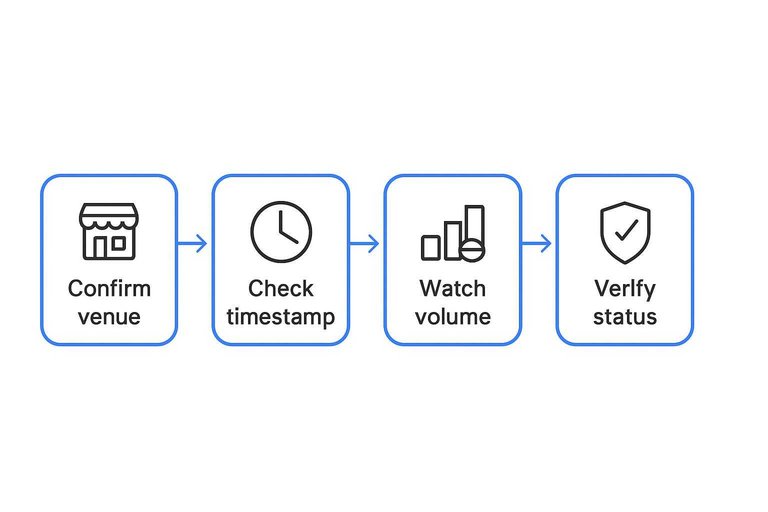
Before trusting any price, confirm the venue, the market status, and the last time the quote was refreshed. Otherwise, you’re trading yesterday’s screen.
Platform breadth
Coverage is the first freshness problem. If a venue is missing, the “best price” can be fictional.
- Supported venues you actually trade
- How new platforms get added
- Whether niche venues are excluded
- How missing markets appear in search
- How browsing hides coverage gaps
If you can’t see the venue list clearly, assume you’re not seeing the full market.
Update cadence signals
You need fast signals for “is this live?” without digging. MarketsPrediction tends to make this easier because it’s built around cross-platform live odds and scanning.
Look for practical tells:
- A visible timestamp or “last updated” label near the odds
- Recent volume or liquidity movement, not just a static price
- A trending feed that refreshes when activity shifts
- Obvious mismatches across platforms for the same question
If the price looks isolated from volume and time, treat it as a cached snapshot.
Market lifecycle
Freshness also means knowing what stage a market is in. Newly launched markets can be thin, resolved markets can linger, and paused markets can display misleading odds.
Check whether each tool shows:
- Newly launched markets as “new,” not buried
- Resolved markets as resolved, with final outcome
- Paused or suspended markets as non-tradable
- Clear links back to the source venue for verification
MarketsPrediction is usually the winner for lifecycle visibility because active scanning surfaces what’s trading now, not what merely exists.
Winner call
Winner: MarketsPrediction.
The deciding reason is cross-platform live odds aggregation, which makes staleness easier to spot and easier to avoid.
Cross-platform price comparison
Same-market matching
Two listings only compare cleanly if they resolve from the same rules. Otherwise, you’re pricing two different bets.
Check these contract specs before you trust a “better price”:
- Resolution source and exact wording
- Deadline and timezone for outcomes
- Market type (binary, multi-outcome)
- Settlement rules and edge cases
If any one differs, treat them as separate markets and stop the comparison.
Live odds aggregation
Good aggregation saves you from tab-hopping and half-informed fills.
- Live odds for each venue
- Bid/ask spread or price range
- Volume and liquidity cues
- One-click switching to the venue
- Clear timestamp for updates
If you can’t see spread and liquidity, you’re comparing headlines, not tradable prices.
Where MarketsPrediction wins
MarketsPrediction is built for the exact moment you’re asking, “Where is the best executable price right now?” It puts cross-platform live odds and activity cues next to each other, then lets you filter hard by platform and category.
That side-by-side scanning is the difference between spotting an edge and missing it while you open tabs.
Where Index can win
Prediction Market Index can feel calmer when you’re browsing rather than trading. If you want a simpler directory-like view or curated discovery, tight price comparison matters less.
When your goal is “find interesting markets,” not “route to best fill,” simpler can be faster.
Winner call
MarketsPrediction wins for cross-platform price comparison. The decisive feature is live, side-by-side odds with liquidity cues, so you can choose the most liquid venue without guessing.
Use Index for discovery days, then use MarketsPrediction when you’re ready to execute.
Discoverability and navigation
Discoverability is the moment you go from “I wonder if there’s a market for that” to an actual tradable contract. The best navigation gets you there in a few clicks, not a few tabs.
MarketsPrediction’s edge is consolidation. Cross-platform browsing cuts the “where do I even look” step down to one place.
Search and filters
Fast narrowing depends on a few filters that match how you already think. If one is missing, you end up scrolling instead of deciding.
- Category filter (politics, sports, crypto, etc.)
- Platform filter (Kalshi, Polymarket, and others)
- Market status (open, resolved, pending)
- Sorting (volume, liquidity, newest)
- Keyword search with partial matches
Winner for narrowing fast: MarketsPrediction, because platform + category filtering works across aggregated listings.
Trending discovery
A trending feed is only useful if it separates “popular” from “tradable now.” You want signals like fresh volume, tight spreads, and multiple platforms showing activity.
MarketsPrediction tends to surface what’s active now better, because its trending view can reflect cross-platform movement instead of one venue’s internal hype.
Top by volume views
Top-by-volume lists matter because volume is a practical proxy for execution risk. Use them to avoid markets where you can’t enter cleanly, exit cleanly, or size a position without moving price.
MarketsPrediction wins here when it offers “top markets by volume” style views, since you can scan activity and then pick the best venue for pricing.
Winner call
MarketsPrediction wins navigation for one core reason: it compresses cross-platform discovery into a single browsing flow. You search once, filter once, then compare odds and activity without switching sites.
That workflow advantage is the difference between finding a market and actually acting on it.

Platform comparison tools
Choosing where to trade gets annoying fast. Deposit rules, minimums, and payouts are usually scattered across help pages.
MarketsPrediction makes this step feel like a single screen decision. Prediction Market Index can still work, but it often sends you hunting.
What to compare
You want to compare the few constraints that change your ability to trade. Miss one, and you learn it at checkout.
- Deposit methods
- Minimum deposit
- Payout speed
- Fees and spreads
- Geo limits and eligibility
Also note account requirements, like identity checks or custody rules. That’s where “available” becomes “not for you.”
Comparison tables
A good comparison table answers “Can I fund, trade, and withdraw?” at a glance. It also tells you what will surprise you later.
Look for tables that include:
- Deposit rails and constraints
- Minimums and common limits
- Payout method and timing
- Fee types and where charged
Sanity-check anything that matters in the platform’s own docs. If a table can’t link you to the source page, treat it as a lead.
MarketsPrediction wins here because it leans into platform comparison tables while you browse markets. Index can inform you, but MarketsPrediction helps you decide faster.
For a concrete example, see side-by-side platform comparisons.
When Index is enough
Sometimes you just need basic notes to avoid obvious mismatches. If you already know your platform, deep comparison is wasted motion.
Index is enough when:
- You only trade on one venue
- You already passed eligibility checks
- Your deposit method is fixed
In those cases, platform differences are background noise. Spend your time on market structure, not checkout details.
Winner call
MarketsPrediction is the better pick for platform selection support. The differentiator is side-by-side platform comparison tables paired with cross-platform market discovery, so you choose the venue while you choose the trade.
Data clarity and trust
Definitions that matter
Odds, volume, and “active” look obvious until two platforms define them differently. If your aggregator doesn’t pin definitions down, you’ll misread the signal.
Odds format can mean implied probability, contract price, or a best-bid/best-ask snapshot. Volume can mean total traded, 24h traded, or notional versus shares. “Active” can mean open for trading, recently updated, or simply listed.
MarketsPrediction is the safer read here because its cross-platform framing pushes you to sanity-check definitions before you compare.
Sourcing and links
Trust comes from fast verification. You want to click through and confirm the number in one hop.
- Direct links to the original market page
- Clear labels for the source platform
- Visible last-updated or refresh cues
- Consistent market identifiers or slugs
- Simple paths to the order book
If you can’t trace a number back to its market, it’s a vibe, not a signal.
Avoiding false precision
Aggregated views invite overconfidence, especially when they show neat ranks and tight spreads. The catch is that “volume” and “liquidity” often aren’t apples-to-apples across venues.
Use the aggregator for direction, then switch to the underlying platform for execution-level detail. That’s where you confirm bid/ask depth, trading rules, and whether size actually clears.
Treat the index as a map, not a micrometer.
Winner call
Day-to-day, MarketsPrediction is easier to trust because it’s built for cross-platform comparison and quick click-through verification. Its live odds aggregation, trending feed, and platform/category filters make it harder to confuse “busy” with “tradeable.”
Prediction Market Index can still be useful as a simpler snapshot, especially when you just want a quick read. But when definitions diverge, MarketsPrediction gives you more context to verify before you act.
Trust comes from traceability, and MarketsPrediction is closer to that workflow.
Pick Your Default, Then Validate the Price
- If you want the fastest way to spot what’s active and compare prices across platforms, start with MarketsPrediction—its live odds aggregation, trending feed, category/platform filters, and top-by-volume views make scanning and decision-making quicker.
- If you prefer a simpler index-style overview or you’re double-checking a specific market’s context, Prediction Market Index can be a solid secondary reference.
- Before you place a trade, click through to the source platform from whichever tool you used, confirm the exact contract terms, and re-check liquidity/spread so you’re acting on the current market—not a cached snapshot.
Frequently Asked Questions
- Is Prediction Market Index the same thing as an odds aggregator like MarketsPrediction?
- No. They may both help you find prediction markets, but an aggregator usually focuses on comparing prices and links across venues, while an index may emphasize tracking and organizing markets as a reference layer.
- Do I need an account on Manifold, Polymarket, or Kalshi to use Prediction Market Index or MarketsPrediction?
- No. You can usually browse and compare markets without an account, but you’ll need an account on the underlying trading platform to place trades or redeem payouts.
- How do I verify a prediction market price I found on Prediction Market Index or MarketsPrediction before trading?
- Open the linked market on the original platform and confirm the current price, resolution criteria, and any fees or spread. Also check the market’s last trade time and liquidity/volume indicators on the venue itself.
- Can Prediction Market Index or MarketsPrediction help with arbitrage across prediction market platforms?
- They can help you spot price differences by surfacing similar questions across venues, but you still need to validate market equivalence (wording, resolution source, end date) and account for fees, limits, and settlement rules.
- What’s the best way to track a market over time using Prediction Market Index vs MarketsPrediction?
- Use the tool’s watchlist/alerts if available, and keep a direct link to the source market for real-time checks. For longer-term tracking, export or record snapshots and note any market migrations or rule updates on the underlying platform.