
 Best Platforms
 Live Odds








Resolve Markets vs. MarketsPrediction: Prediction Market Analytics
A head-to-head comparison that settles whether Resolve Markets or MarketsPrediction fits your prediction-market workflow — scanner vs toolbox fit, coverage comparison and what “coverage” means, freshness signals and a 60-second verification routine, privacy/security tradeoffs (API keys vs trade CSV analysis), plus trust/incentives and a decision matrix.
You’re trying to spot the best price on a question without opening five tabs and doing the math by hand. Move too fast and you can chase a spread that isn’t real—because the contracts aren’t truly equivalent, the data is stale, or fees wipe out the edge.
This comparison helps you choose based on your job: quick cross-platform scanning versus authenticated trader tooling and trade analysis. It also walks through what “coverage” actually means, how to sanity-check freshness and resolution rules in under a minute, and what to look for in privacy, incentives, and key-handling before you rely on any dashboard.
Pick your job
Scanner vs toolbox
If your main job is finding where the action is right now, you want a scanner: something you can open and immediately sort, filter, and compare across venues.
MarketsPrediction is built for that discovery loop: it surfaces cross-platform market activity, including “Top Markets By Volume,” platform-level stats like “Volume (24 h)” and “Total Liquidity,” and a visible “Last updated” timestamp so you know how fresh the snapshot is. It also stays read-only by design: it describes itself as an odds-comparison and information service (not a broker, exchange, or trading platform) and says it never receives your third-party trading activity, balances, or accounts.
If your job is understanding your own trading—positions, P&L, what you did, and what you should stop doing—you want a toolbox. Resolve Markets positions itself as “Professional Trading Analytics for Prediction Markets,” with real-time portfolio tracking and an analytics suite across multiple markets in one place. It claims sub-100ms updates via a WebSocket (a live streaming connection for rapid updates) and “institutional-grade tools,” which is the kind of stack you reach for when the dashboard is part of execution, not just research.
One practical divider: Resolve’s Historical Trade Analysis is built around importing your fills—supporting Kalshi and PredictIt transaction CSV exports, auto-detecting the exchange, and allowing uploads up to 50MB—so it can analyze what happened in your account, not just what prices look like in public.
That’s the line: scanning optimizes for speed-to-venue; trader analytics optimizes for accountability-to-results.
Two-minute self-test
- Do you need the best venue fast—based on what’s trending, volume, and liquidity—without logging in?
- Do you need portfolio tracking and performance analytics tied to your actual trades (often requiring an API key, a credential that authorizes account access)?
- Are you willing to use two tools—one for discovery, one for authenticated analysis—instead of forcing one dashboard to do both?
- When you see a cross-platform spread, will you verify the venue’s resolution criteria (the rule text that decides what pays out) before acting, since automated matching can be wrong?
Your answers tell you which feature set matters before you compare layouts and charts.
Coverage that matters
“Coverage” sounds like a simple count. In prediction-market analytics, it’s really three different things: which venues are even in scope, how many markets the product claims to see, and whether it’s comparing like-for-like events or just summarizing platforms.
Coverage comparison
| Coverage detail | Resolve Markets | MarketsPrediction |
|---|---|---|
| Named venues | Claims 8 integrated platforms, and names them on the homepage (including ProphetX, Manifold, Predict.fun, Gemini, and Futuur). | Names venues in multiple places (for example, event pages list the platforms included for that specific event). |
| Market-count headline | Claims 90,000+ markets tracked. | Claims 12.5M active markets. |
| What a “covered” event looks like | “Integrated platform” framing: coverage is tied to which venues are built into the product. | Event pages show an event with a per-platform list and “Buy Yes/Buy No” outbound links, so coverage is presented as “this event exists on these venues.” |
What “coverage” means
Two terms matter here because they decide whether a big number is actionable.
Cross-platform matching is the process of deciding that two markets on different venues represent the same question so their prices can be compared. That’s powerful for line-shopping, but it’s also where “coverage” can get fuzzy: one product’s “event” may be an automated grouping, not a guarantee the contracts are equivalent.
Liquidity is how much you can realistically trade near the displayed price without moving it (often proxied by depth or quoted liquidity). In other words: a site can “cover” a market, but if liquidity is thin, the displayed price may not be tradable at size.
With those in mind, you’ll see three different definitions of coverage in the wild:
- Event-level coverage (matched markets): “We found the same question on multiple venues and aligned them.” The key risk is matching errors. The scanner’s own Terms of Use explicitly warns its automated systems can make mistakes—including matching errors, stale data, and cases where markets have materially different resolution criteria.
- Platform-level coverage (venue stats): “We track this venue’s activity and summarize it.” That’s useful when your must-have venue is non-negotiable, even if the site can’t confidently match every event across venues.
- Account-connected coverage (your portfolio): “We cover what you traded because we can read your account data.” That’s a different kind of completeness: fewer venues might be supported, but the data can be specific to your positions rather than just public snapshots.
The practical move: treat a venue list as a hard filter. If your must-have venue isn’t explicitly named as integrated on Resolve’s homepage, it’s out of scope there; for the scanner, confirm your venue appears on the views you’ll actually use (the platform lists on the events you care about), not just in a general sense.
Is the data tradable?
A displayed “spread” is only actionable if you trust two things at once: (1) the numbers are fresh enough to still exist when you click through, and (2) the two contracts being compared are actually the same bet.
This is where scanner-style aggregators and execution-adjacent analytics tools behave very differently. A scanner (the “discovery” layer—e.g., MarketsPrediction aggregating cross-platform odds, volume, and liquidity in one view) is optimized for fast comparison and triage; an execution-adjacent tool is optimized for data that stays coherent as you trade. It’s also where practitioners disagree: some treat headline odds as “the arb,” but the counter-position is that fees and data latency can dominate the edge in practice.
Freshness signals
The easiest reliability check is whether you’re looking at a snapshot or a stream.
On the scanner side, you get an explicit snapshot cue: a “Last updated” timestamp. That’s useful because it tells you when the page stopped reflecting the market, which matters the moment you try to act on a one- or two-tick difference. In practice, scanners that also surface where activity is concentrating (e.g., “top by volume” lists or liquidity/volume fields next to odds) can help you avoid spending time on a spread that’s only “real” on paper.
On the trader-tooling side, the pitch is closer to “treat this like live market data,” using a WebSocket (a live streaming connection that pushes updates continuously). That can be the right shape when your dashboard is part of execution, but it doesn’t magically remove third-party dependency: the tool is still downstream of an exchange feed, and latency or stale inputs can still leak into what you see.
Two practical failure modes to watch for:
- Headline stats aren’t your fill. A platform-level stat like “Volume (24 h)” or “Total Liquidity” can be true at the platform level while your specific contract is thin at the top of book. Treat big numbers as a reason to look closer, not a reason to skip verification.
- Click-through paths can drift. Some event pages provide “Buy Yes/Buy No” links that route through a separate tracker domain (tracker.gemified.dev). Even if the destination is correct, a redirect layer is one more place where “what you thought you clicked” and “what you’re about to trade” can diverge if the mapping is off.
If the edge you’re seeing is small, freshness is the whole trade: stale data turns “actionable” into “probably already gone.”
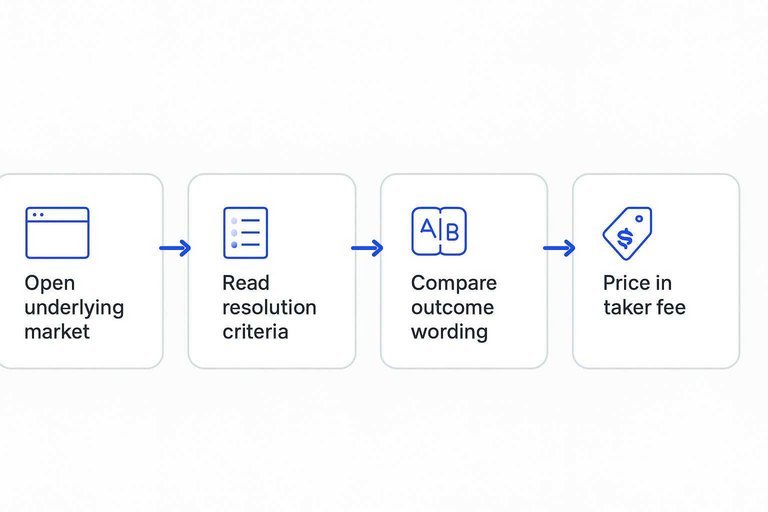
60-second verification
Do this whenever you’re about to trade based on a cross-venue spread.
- Open the underlying market on the venue itself. Don’t trade from the aggregator page—even if you found the opportunity via a fast scanner like MarketsPrediction.
- Read the resolution criteria (resolution rules). That’s the exact rule text that determines which outcome pays out; similar titles can still resolve differently.
- Compare the exact outcome wording across venues. You’re checking that “Yes” means the same thing everywhere, not just that the event names look similar.
- Price in the taker fee. A taker fee is what you pay when you remove liquidity (hit an existing order), and it can flip a “profitable” spread into a losing trade.
- Sanity-check tradability, then look for negative-risk traps. Negative risk is a multi-outcome pricing situation where the sum of contract prices implies >100%, sometimes creating a mechanical edge if fills are possible—but only if you can actually get the fills you’re assuming.
One more reality check: Resolve Markets’ sports-odds arbitrage tooling bakes fee assumptions into its arb detection and still warns that it does not verify upstream sportsbook accuracy/latency. Take that as your cue to verify before you size up.
Privacy and security
Different analytics workflows expose different kinds of data. The cleanest way to choose is to map the product to your risk boundary: read-only browsing (no credentials, no trade history), API-key dashboards (account-connected), or CSV uploads (your fills, but as a file you control).
MarketsPrediction model
Because it’s a scanner-style site, the privacy tradeoff is mostly about what happens when you click out rather than what you “connect.” You can browse markets without handing over exchange credentials or uploading your trade history.
On event pages, the “Buy Yes / Buy No” buttons route through a separate tracking domain (tracker.gemified.dev) before landing you at the venue. That’s a concrete data flow to be aware of: your click path is not purely “site → exchange.” If that extra hop is outside your comfort zone, treat the scanner as read-only research and open venues directly when you’re ready to trade.
Its Privacy Policy shows a “Last Updated” date of August 13, 2026, which is useful as a quick sanity-check for how recently the site has published its current data-handling commitments.
Resolve key handling
An API key is a credential that authorizes access to an exchange account or endpoints; in analytics dashboards, it’s what enables things like position tracking.
Resolve’s core claim is an on-device (in-browser) key model: it says prediction-market API private keys are encrypted in your browser with AES-256-GCM (an authenticated encryption scheme) and stored only in your browser’s IndexedDB (a local browser database). It also says those keys are never transmitted to or stored on Resolve servers.
Mechanically, Resolve describes a “local signing” architecture: your browser uses the encrypted private key to sign requests locally, and only the signed request is sent through Resolve’s backend and forwarded to the exchange. If you’re evaluating risk, that’s the line between “vendor can potentially access my key” and “vendor is a relay for requests I already authorized on-device.”
A WebSocket is a live data connection that streams updates continuously; real-time dashboards that use streaming data tend to be more “account-adjacent,” so it’s worth pairing the latency benefits with a clear key-handling story.
Trade CSV analysis (what you’re exposing)
CSV import is a different bargain: no standing credential, but you’re handing over a copy of your history.
- Supported sources: Kalshi and PredictIt transaction CSV exports.
- Exchange auto-detection: the tool detects which exchange the file came from.
- Upload limit: 50MB maximum.
- Try-before-upload: a “Try Demo Data” option lets you test charts without your own file.
- Multiple files: you can upload more than one file.
- Exports: chart downloads are available at 1920×1080.
- Contracts-column tradeoff: deleting the “contracts” column increases privacy, but removes some charting functionality.
Trust and incentives
You’re not just judging charts here. You’re judging what might steer the charts you notice and the actions you take—especially around promos and click-through paths.
One nuance: “scanner” sites can be both useful and commercially opinionated at the same time. In other words, a product can genuinely help you compare odds and activity across venues, while still having incentives around which platforms or offers get extra visibility. The practical move is to treat disclosures as signal, then use your own verification (and, where available, neutral filters by category/platform) to keep discovery from turning into decision.
| Potential bias / constraint | Resolve Markets (trader analytics) | MarketsPrediction (scanner) |
|---|---|---|
| Promo / affiliate influence on what gets shown | Discloses a “$0 to get started” entry point (no credit card required), but this doesn’t explain how featured items are selected. | Its Terms of Use explicitly say it may receive compensation from promotional offers/links, and that this compensation may influence which platforms and offers appear, plus where and how they’re displayed. (The upside is you’re not left guessing that promos exist—still, treat “featured” as a starting point and cross-check against the underlying market stats.) |
| Outbound clicks that add a tracking layer | No click-out tracking flow is disclosed in the sources used here. | Event pages include “Buy Yes / Buy No” links that route through tracker.gemified.dev before landing you on a venue. That extra hop is worth noticing if you’re sensitive to attribution, tracking, or “what exactly did I click?” risk—even when the destination is ultimately correct. |
| Operational/legal constraints power users care about (scraping/redistribution) | The only explicit Terms detail available here is a “Last Updated” date (March 6, 2026). No scraping/redistribution restriction language was available in the provided excerpts. | No scraping/redistribution restriction language was available in the provided excerpts. |
If you’re using a scanner to decide where to trade, treat anything “featured” or “promoted” as a lead—not a conclusion—and open the venue directly before you commit capital.
Decision matrix
Use this matrix to pick between MarketsPrediction (a no-login scanner) and Resolve Markets (account-connected trader analytics) based on the job you’re doing right now.
| Persona (your primary job) | Pick | Why this fits | One verification step before you act |
|---|---|---|---|
| “Show me where the action is” scanner (you’re line-shopping and want fast discovery) | Scanner | You’re optimizing for quick sorting/filtering across venues, not for auditing your own positions. | Confirm you’re not relying on a platform “Top 30” slice for discovery; if the market isn’t in that list, open the venue directly and search there. |
| Market-activity watcher (you track big-picture flow, not individual fills) | Scanner | If you care about broad signals, platform stats are the point: the homepage surfaces market-wide activity dashboards and per-platform comparisons (including brands like Plus500, Polymarket, Foregate, and Trendle). | Match the metric to your decision. If you’re choosing where to trade today, don’t anchor on open interest when what you needed was recent activity (and vice versa). |
| Event-first researcher (you start from specific events and compare where they’re active) | Scanner | Event pages can surface per-platform implied odds plus an at-a-glance activity snapshot for the event—useful for triage before deeper work. | Open the event on the venue you’ll use and confirm the outcome labels match what you intend to trade (same “Yes/No,” same wording). |
| Performance auditor (you want portfolio/trade analytics tied to what you did) | Resolve Markets (https://resolvemarkets.com) | This is the “toolbox” pick when your dashboard is about accountability: positions, performance review, and trader-grade workflows. | Verify the commercial reality upfront: there’s no free tier, and pricing is not publicly listed, so you should be comfortable evaluating it without a posted price sheet. |
| Hybrid power user (scan broadly, then analyze your account) | Both | Use the scanner to find candidates fast, then move to Resolve for the decisions that require your own position data. | Write a hard boundary before you trade: scanning decides what to look at; account analytics decides sizing/exposure. That prevents “pretty discovery” from becoming “unverified execution.” |
Choose the tool by job
If your goal is to spot the best venue fast without logging in, MarketsPrediction is the better default: it’s built for cross-platform scanning with clear freshness cues, and you can keep it strictly read-only while you triage markets. Pick Resolve Markets when the question isn’t “where’s the price?” but “what did I actually do?”—portfolio tracking and fill-level analysis—accepting that there’s no free tier, pricing isn’t public, and its CSV workflow is limited to Kalshi/PredictIt (with a 50MB upload cap). The safest way to use either is to treat any apparent spread as a lead: open the market on the venue itself, read the resolution rules, confirm the outcome labels match, and only then decide whether the taker fee and tradability leave a real edge.
Frequently Asked Questions
- Is Resolve Markets the same thing as MarketsPrediction for prediction market analytics?
- No—Resolve Markets is built for account-connected trader analytics (positions and performance), while MarketsPrediction is a no-login scanner for cross-platform discovery and comparison (odds, volume, and liquidity).
- Can I rely on a cross-platform “best price” shown in Resolve Markets vs. MarketsPrediction as an instant arbitrage?
- Treat any displayed spread as a lead, then verify the two contracts are the same bet by checking the outcome wording and resolution criteria on each venue before you place a trade. If the labels don’t match exactly, the “arb” is a false match.
- What’s a fast checklist to confirm two prediction-market contracts are actually comparable across platforms?
- Open both venue pages and confirm (1) identical outcome labels (Yes/No or candidate/team), (2) the resolution source and cutoff time, and (3) any edge cases (runoffs, postponements, cancellations) are handled the same way in the rules.
- If I don’t want to connect an API key, should I use MarketsPrediction or Resolve Markets?
- Use MarketsPrediction for read-only research because it’s designed for no-login scanning across platforms, then go directly to the venue when you’re ready to execute. Use Resolve Markets when you want analytics tied to your own account activity.
- Does Resolve Markets have more than one product (resolvemarkets.com vs resolvemarkets.io), and does it matter for evaluation?
- Yes—Resolve Markets runs separate surfaces, and mixing them up can lead you to evaluate the wrong thing; confirm you’re looking at the analytics product on resolvemarkets.com rather than the separate prop-firm surface on resolvemarkets.io.